Calendar
The Calendar app allows schedule sharing among family members and provides an at-a-glance view of everyone’s schedule. You must connect to your Google calendar or Microsoft Office 365 calendar to use the Calendar app.
When user chooses to enable Google or Microsoft Office 365 calendar integration within Calendar, user's schedule from Google or Microsoft 365 syncs to Calendar calendar app and vice versa.
Through this integration, users can share there schedules from Google Calendar or Microsoft 365 by displaying it on the fridge screen, for a more communal family sharing experience.
To access the Calendar app
On the Home screen, tap the Calendar app.
The design of the app and the controls may differ depending on your settings and software version. If you have deleted the app from the Home screen, tap Apps and then tap the app to add it back to the Home screen.
Main screen description
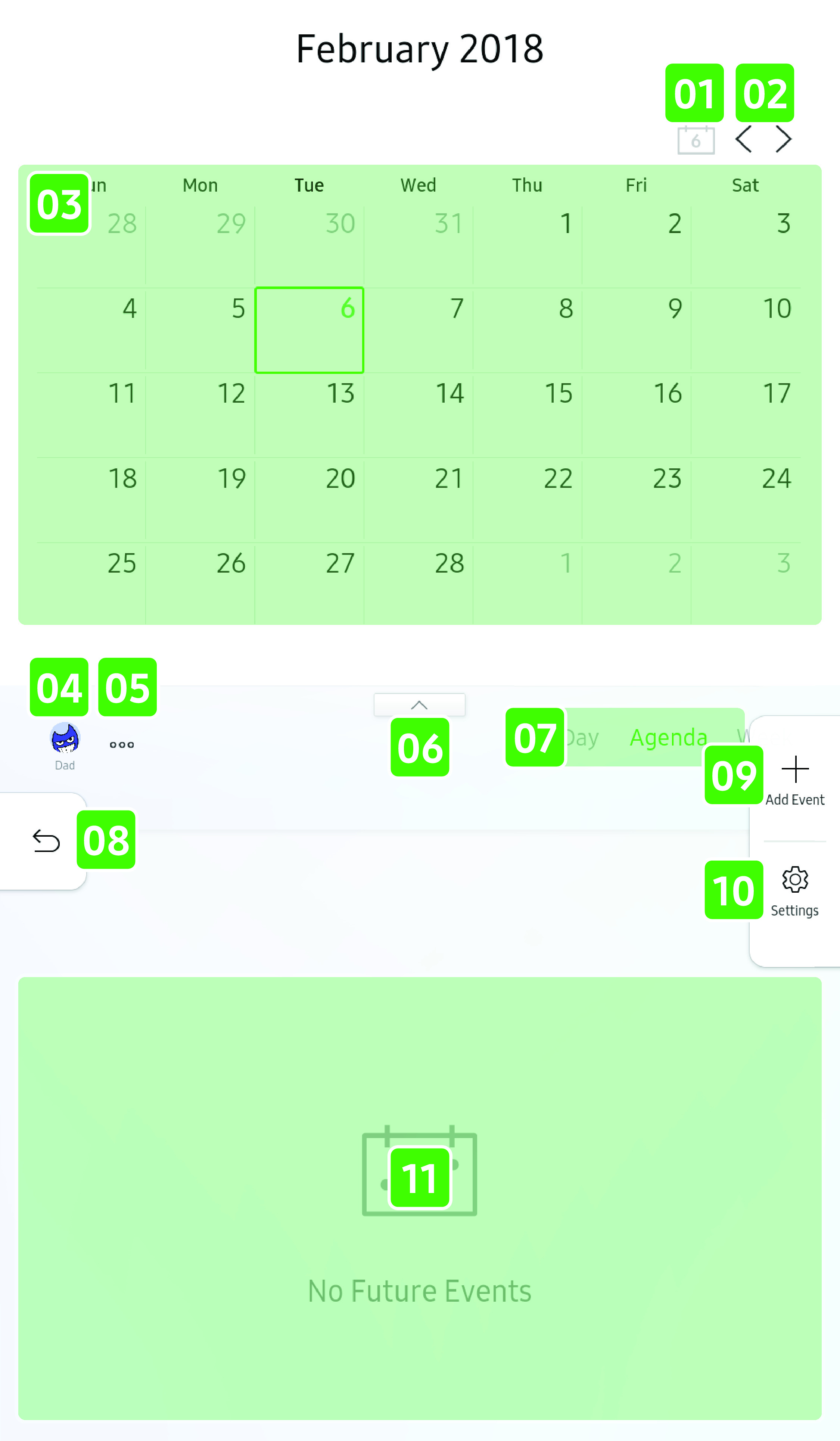
- 01 Today
-
- Tap to go to today’s date.
- 02 Previous/next
-
- Tap to go to the previous or next time span.
- 03 Calendar
-
- Displays the calendar with events.
- 04 Profile
-
- Tap to display or hide events for the selected profile.
- 05 Filter
-
- Tap to set and apply advanced filters.
- 06 Collapse/expand calendar
-
- Tap to collapse or expand the calendar.
- 07 Day/Agenda/Week
-
- Tap to select the view for the event viewer.
- 08 Return
-
- Tap to return to the Home screen.
- 09 Add event
-
- Tap to add an event.
- 10 Settings
-
- Tap to go to the calendar settings.
- 11 Event viewer
-
- Displays events.
To add an event
- On the Calendar app’s main screen,
tap Add Event
 .
.
- You can also tap anywhere in the event viewer in Day or Week view.
- On the Add Event screen, set
the following details.
- Profile: Tap the dropdown menu to select a profile.
- Title: Enter a title for the event.
- Date & Time: Select a time range for the event.
- Location: Enter an event location.
- Note: Enter a note about the event.
- Invitees: Tap the profile to
invite other Calendar users to this event. To add non-Calendar
users, tap , and then enter
their emails.
- Alert: Tap to select a time to receive an event alert.
- Repeat: Tap to select repeat options for this event.
- Tap ADD to add the event to the calendar.
To edit or delete an event
- In the Agenda view, tap an event
you want to edit or delete.
- In the Day or Week view, tap an event, and then tap
 .
.
- Change the information you want to edit.
- Skip this step if you want to delete the event.
- Tap SAVE to save the changes. To delete the event, tap DELETE.
You can edit or delete an event that you created. However, you can only delete an event that you were invited to.